离线预测
信息
除了使用“预测”按钮在线进行预测外,您还可以使用下载的模型离线进行预测。具体步骤如下。
下载模型
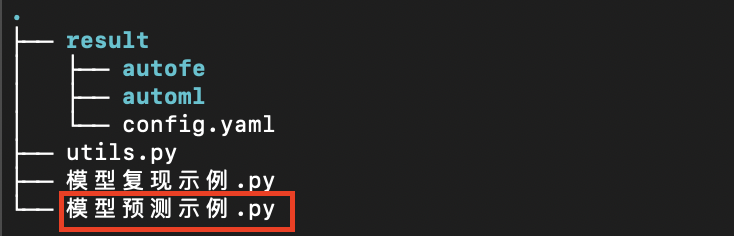
用户点击建模任务列中对应任务的下载模型按钮下载该任务训练完成的模型,此时会获取到一个压缩文件,解压之后大致内容如下:
搭建预测环境
这里假定用户已经安装好了Anaconda (https://www.anaconda.com) 环境,该环境是用于快速安装Python环境的工具,然后运行如下命令搭建预测环境:
# 创建Python虚拟环境
conda create -n changtian python==3.10 -y
# 激活虚拟环境
conda activate changtian
# 安装预测框架依赖
pip install changtianml -i https://pypi.tuna.tsinghua.edu.cn/simple/
至此预测环境搭建完毕!
模型预测
信息
本平台已经在Python公有仓库 PyPI (https://pypi.org) 中发布了预测框架库 ChangTianML (https://pypi.org/project/changtianml) 。
通过该依赖库可以更加便携的方便用户完成预测等相关工作。
模型运行可以参考平台提供的模型预测示例.py样例文件,该文件中的注释部分详细说明了预测框架库的功能和基本使用,请用户详细阅读。下面提供一段代码仅供参考:
模型预测示例
# -*- coding: utf-8 -*-

# Import necessary libraries
from changtianml import tabular_incrml

"""
Example script for model prediction using changtianml.

Step instructions:
    1. Install virtual environment
        a. Create a virtual environment named 'changtian', specifying Python version 3.10.
        b. Activate the created virtual environment.
        c. Install the 'changtianml' package via pip.

    2. Use changtianml for model prediction
        a. Use the 'tabular_incrml' class to load the trained model from the specified path.
        b. Use the model to make predictions on test data.
        c. If it's a classification task, you can also obtain the model's predicted probabilities for each class.

Commands for installing the virtual environment:
    conda create -n changtian python==3.10 -y
    conda activate changtian
    pip install changtianml -i https://pypi.tuna.tsinghua.edu.cn/simple/

"""

# TODO: Users need to fill in the storage path for the model training results
res_path = ''  # For example: 'result'

# TODO: Users need to fill in the path for the test data
# Note that the test data must be consistent with the data uploaded to the changtianml platform. If there are multiple csv files, please place them in a separate folder and fill in the folder path
test_path = ''  # For example: 'test_data.csv'

# Use the tabular_incrml class to load the trained model
ti = tabular_incrml(res_path)

# Use the predict method to make predictions on test data
pred = ti.predict(test_path)
print("Prediction results:", pred)

# If it's a classification task, use the predict_proba method to get the predicted probabilities for each class
# proba = ti.predict_proba(test_path)
# print("Predicted probabilities:", proba)