Offline Predictions
Apart from make predictions online using “Predict” button, you can also make predictions offline using downloaded models. The specific steps are as follows.
Download Model
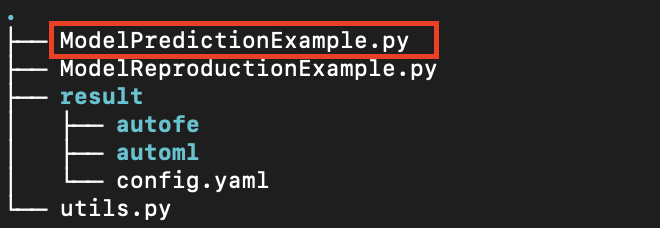
Click the “Download model” button to download the model that has been trained by the task. At this time, a compressed file will be obtained, and the general content after decompression is as follows:
Install Prediction Environment
Based on the conda/Anaconda environment, which is a tool for quickly installing the Python environment, you can run the following command to set up the prediction environment:
# Create a Python virtual environment
conda create -n changtian python==3.10 -y
# Activate virtual environment
conda activate changtian
# Install predictive frame dependencies
pip install changtianml -i https://pypi.tuna.tsinghua.edu.cn/simple/
Well done! The prediction environment is completed!
Model Prediction
At present, the platform has released the library “changtianml” in the Python public warehouse PyPI, which can be more portable and convenient for users to make predictions and other related work.
The model can be run by referring to the ModelPredictionExample.py sample file provided by the platform. The comments in the file explain the functions and basic usage of the library in detail. Please read it. Here is a piece of code for reference only:
Model Prediction Example
# -*- coding: utf-8 -*-

# Import necessary libraries
from changtianml import tabular_incrml

"""
Example script for model prediction using changtianml.

Step instructions:
    1. Install virtual environment
        a. Create a virtual environment named 'changtian', specifying Python version 3.10.
        b. Activate the created virtual environment.
        c. Install the 'changtianml' package via pip.

    2. Use changtianml for model prediction
        a. Use the 'tabular_incrml' class to load the trained model from the specified path.
        b. Use the model to make predictions on test data.
        c. If it's a classification task, you can also obtain the model's predicted probabilities for each class.

Commands for installing the virtual environment:
    conda create -n changtian python==3.10 -y
    conda activate changtian
    pip install changtianml -i https://pypi.tuna.tsinghua.edu.cn/simple/

"""

# TODO: Users need to fill in the storage path for the model training results
res_path = ''  # For example: 'result'

# TODO: Users need to fill in the path for the test data
# Note that the test data must be consistent with the data uploaded to the changtianml platform. If there are multiple csv files, please place them in a separate folder and fill in the folder path
test_path = ''  # For example: 'test_data.csv'

# Use the tabular_incrml class to load the trained model
ti = tabular_incrml(res_path)

# Use the predict method to make predictions on test data
pred = ti.predict(test_path)
print("Prediction results:", pred)

# If it's a classification task, use the predict_proba method to get the predicted probabilities for each class
# proba = ti.predict_proba(test_path)
# print("Predicted probabilities:", proba)