模型复现
复现步骤
步骤一:下载模型
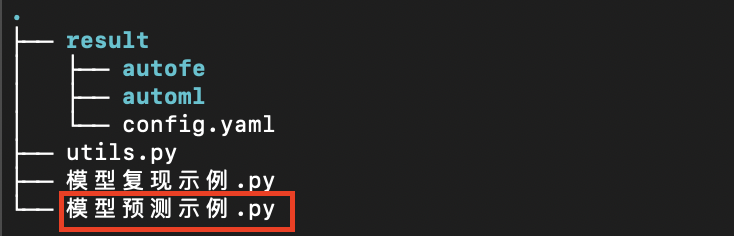
用户点击建模任务列中对应任务的下载模型按钮下载该任务训练完成的模型,此时会获取到一个压缩文件,解压之后大致内容如下:
步骤二:搭建预测环境
这里假定用户已经安装好了Anaconda (https://www.anaconda.com) 环境,该环境是用于快速安装Python环境的工具,然后运行如下命令搭建预测环境:
# 创建Python虚拟环境
conda create -n changtian python==3.10 -y
# 激活虚拟环境
conda activate changtian
# 安装预测框架依赖
pip install changtianml==0.2.11 -i https://pypi.tuna.tsinghua.edu.cn/simple/
本平台已经在Python公有仓库 PyPI (https://pypi.org) 中发布了预测框架库 ChangTianML (https://pypi.org/project/changtianml) 。
通过该依赖库可以更加便携的方便用户完成预测等相关工作。
模型运行可以参考平台提供的模型复现示例.py样例文件,该文件中的注释部分详细说明了预测框架库的功能和基本使用,请用户详细阅读。
至此预测环境搭建完毕!
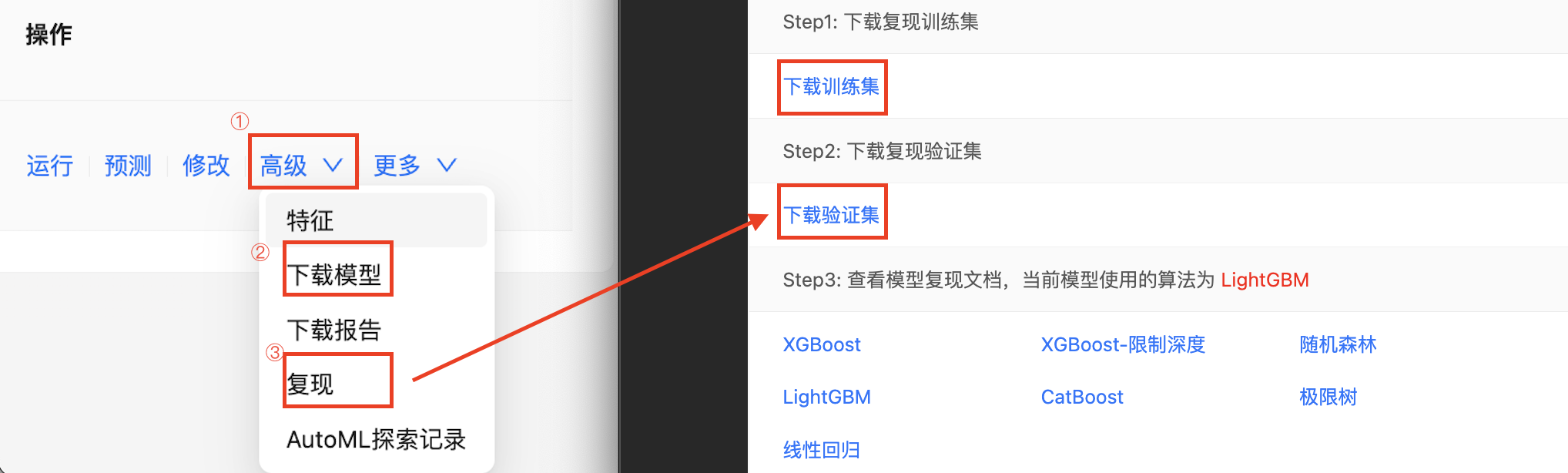
步骤三:下载模型训练集和测试集
选择任务右侧的高级按钮,然后点击下拉框的复现按钮。
步骤四:模型预测
模型复现示例
# Import necessary libraries
import os
import pandas as pd
from changtianml import tabular_incrml

def eval_score(task_type, y_val, y_pred, y_proba=None):
    """
    Args:
    task_type (str, optional): task type, classification or regression
    y_val (pd.Series): true label of the validation set
    y_pred (pd.Series): label predicted by the model
    y_proba (pd.Series, optional): probability predicted by the model, only required for classification tasks, default is None.

    Returns:
    dict: calculated values of common indicators
    """
    if task_type == 'classification':
        from sklearn.metrics import accuracy_score, precision_score, recall_score, f1_score, roc_auc_score, log_loss

        val_loss = log_loss(y_val, y_proba)
        val_f1 = f1_score(y_val, y_pred, average='weighted')
        val_accuracy = accuracy_score(y_val, y_pred)
        val_precision = precision_score(y_val, y_pred, average='weighted')
        val_recall = recall_score(y_val, y_pred, average='weighted')
        if y_proba.shape[1] > 1:
            num_classes = y_proba.shape[1]
            val_auc_roc = 0.0
            for class_idx in range(num_classes):
                val_auc_roc += roc_auc_score((y_val == class_idx).astype(int), y_proba[:, class_idx])
            val_auc_roc /= num_classes
        else:
            val_auc_roc = roc_auc_score(y_val, y_proba)
        return {
            "val_log_loss": val_loss,
            "val_f1": val_f1,
            "val_accuracy": val_accuracy,
            "val_precision": val_precision,
            "val_recall": val_recall,
            "val_auc": val_auc_roc,
        }
    else:
        from sklearn.metrics import mean_squared_error, mean_absolute_error, r2_score
        import numpy as np

        val_mse = mean_squared_error(y_val, y_pred)
        val_rmse = np.sqrt(val_mse)
        val_mae = mean_absolute_error(y_val, y_pred)
        val_r_squared = r2_score(y_val, y_pred)
        if np.isnan(val_r_squared):
            val_r_squared = -1
        alpha = 0.5
        return {
            'val_MSE': val_mse,
            'val_RMSE': val_rmse,
            'val_MAE': val_mae,
            'val_R-squared': val_r_squared,
        }

# Hyperparameter settings
res_path = "result"             ### The directory where the trained model is downloaded
test_path = "validation.csv"    ### The path of the validation dataset which is downloaded

# Specify the model directory to load the model
ti = tabular_incrml(res_path)
target_name = ti.target_name
task_type = ti.task

# View model parameters
print("model params:", ti.model.best_config, "\n")

# Specify the prediction dataset to start prediction
df = pd.read_csv(test_path)
X_val, y_val = df.drop(columns=[target_name]), df[target_name]

# Model prediction results
pred = ti.model.predict(X_val)
proba = ti.model.predict_proba(X_val) if task_type == 'classification' else None

# Model Validation
model_res = eval_score(task_type, y_val, pred, proba)

# View the Output
for k, v in model_res.items():
    print(f"{k}: {v}")
附录:使用固定模型
尽管本平台提供了自动化特征工程和自动化机器学习功能,但是有时在进行建模研究时被要求只能使用某个特定的机器学习模型算法,尽管这个算法可能不是在指标上的最优选择。
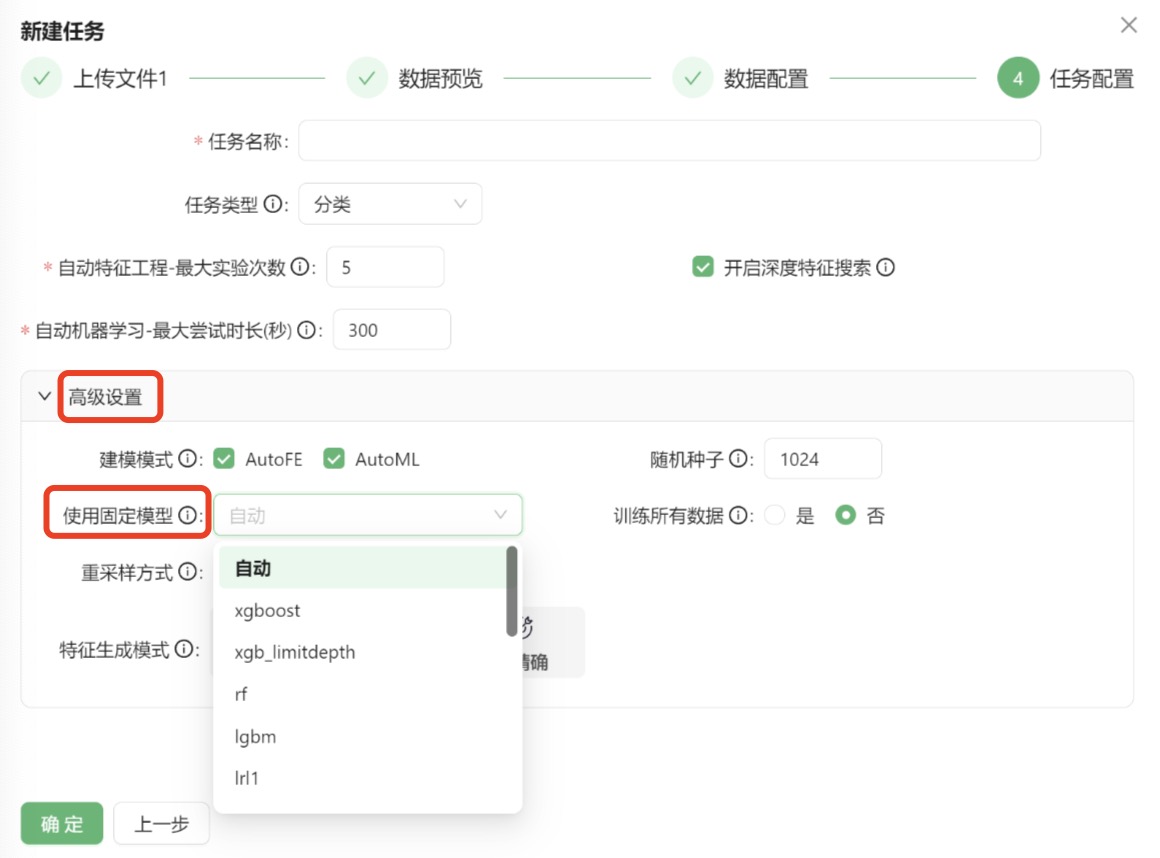
本平台支持在自动化机器学习环节中指定固定模型进行训练,在新建任务最后的任务配置阶段,高级设置中增加了固定模型的下拉列表,允许用户选择算法模型,系统将根据对指定的算法进行建模和超参调优,如下图:
这个过程不受前面AutoFE自动化特征工程的影响,如果按照默认勾选进行了自动化特征工程,这里指定的模型也是对原始特征和AutoFE衍生后的特征一起进行的训练。
由于用户指定了固定算法,在AutoML自动化特征工程阶段所有的时间预算都会在这个算法下进行调优,省去了搜索其他算法模型的时间,从而在精度上也会有所提升。
附录:探索记录
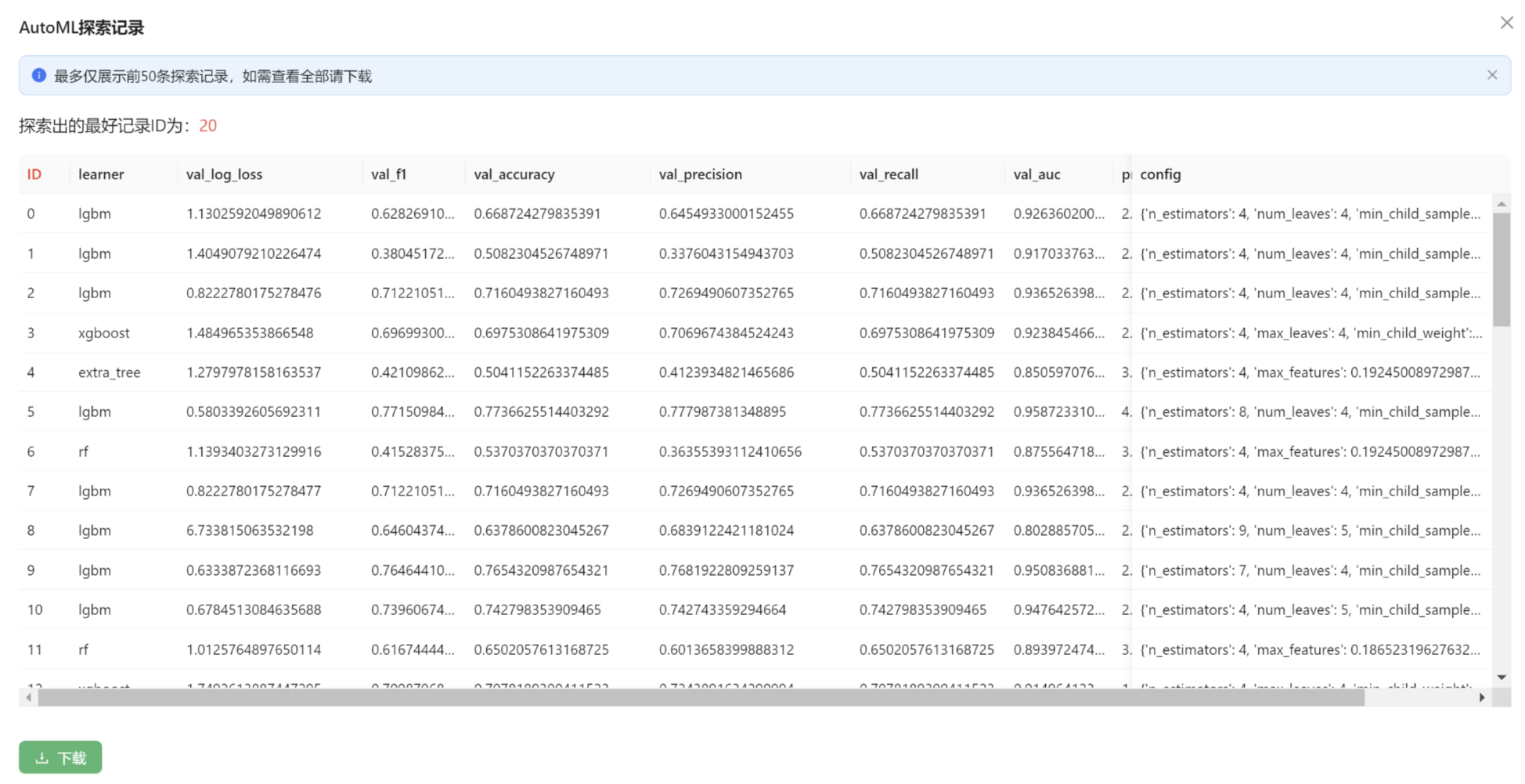
本平台在自动化机器学习阶段会搜索很多算法和相应的超参数组合。用户可以点击高级选项卡中的AutoML探索记录按钮。这些记录中体现了不同轮次的算法和对应参数进行复现,同时提供了更多灵活的选择空间,如下图: