Model Reproduction
Reproducte Steps
Step 1: Download model
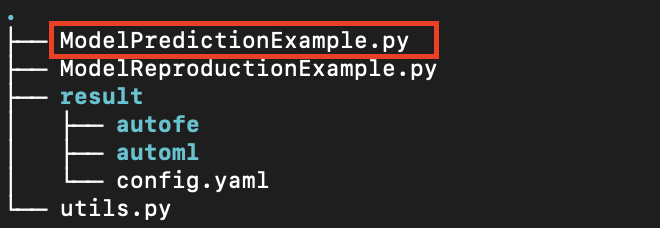
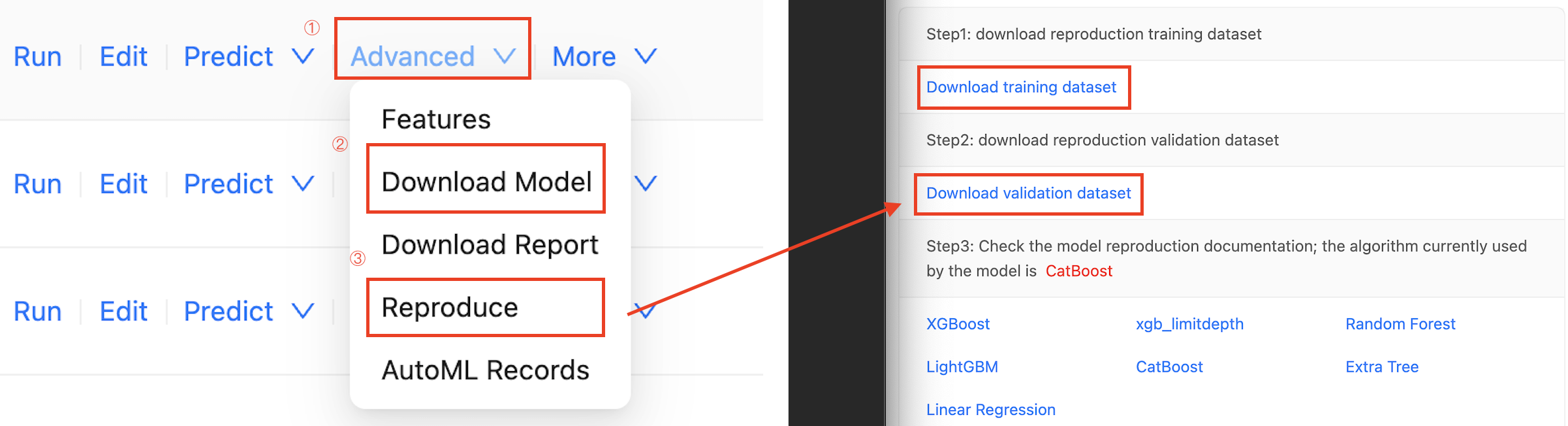
You can click the Down model button of the corresponding task in the modeling task column to download the model that has been trained by the task. At this time, a compressed file will be obtained, and the general content after decompression is as follows:
Step 2: Install prediction environment
This assumes that the user has already setup the Anaconda environment, which is a tool for quickly installing the Python environment, and then runs the following command to set up the prediction environment:
# Create a Python virtual environment
conda create -n changtian python==3.10 -y
# Activate virtual environment
conda activate changtian
# Install predictive frame dependencies
pip install changtianml==0.2.11 -i https://pypi.tuna.tsinghua.edu.cn/simple/
At present, the platform has released the prediction framework library changtianml in the Python public warehouse PyPI, through which the dependency library can be more portable and convenient for users to complete the prediction and other related work.
The model can be run by referring to the ModelReproductionExample.py sample file provided by the platform. The comments in the file explain the functions and basic usage of the prediction framework library in detail. Please read it in detail.
Well done! The prediction environment is completed!
Step 3: Download model training set and test set
Select the Advanced button to the right of the task, then click the Reproduction button to download training set and test set and click the Down model to download trained model in the drop-down box.
Step 4: Model prediction
model reproduction example
# Import necessary libraries
import os
import pandas as pd
from changtianml import tabular_incrml

def eval_score(task_type, y_val, y_pred, y_proba=None):
    """
    Args:
    task_type (str, optional): task type, classification or regression
    y_val (pd.Series): true label of the validation set
    y_pred (pd.Series): label predicted by the model
    y_proba (pd.Series, optional): probability predicted by the model, only required for classification tasks, default is None.

    Returns:
    dict: calculated values of common indicators
    """
    if task_type == 'classification':
        from sklearn.metrics import accuracy_score, precision_score, recall_score, f1_score, roc_auc_score, log_loss

        val_loss = log_loss(y_val, y_proba)
        val_f1 = f1_score(y_val, y_pred, average='weighted')
        val_accuracy = accuracy_score(y_val, y_pred)
        val_precision = precision_score(y_val, y_pred, average='weighted')
        val_recall = recall_score(y_val, y_pred, average='weighted')
        if y_proba.shape[1] > 1:
            num_classes = y_proba.shape[1]
            val_auc_roc = 0.0
            for class_idx in range(num_classes):
                val_auc_roc += roc_auc_score((y_val == class_idx).astype(int), y_proba[:, class_idx])
            val_auc_roc /= num_classes
        else:
            val_auc_roc = roc_auc_score(y_val, y_proba)
        return {
            "val_log_loss": val_loss,
            "val_f1": val_f1,
            "val_accuracy": val_accuracy,
            "val_precision": val_precision,
            "val_recall": val_recall,
            "val_auc": val_auc_roc,
        }
    else:
        from sklearn.metrics import mean_squared_error, mean_absolute_error, r2_score
        import numpy as np

        val_mse = mean_squared_error(y_val, y_pred)
        val_rmse = np.sqrt(val_mse)
        val_mae = mean_absolute_error(y_val, y_pred)
        val_r_squared = r2_score(y_val, y_pred)
        if np.isnan(val_r_squared):
            val_r_squared = -1
        alpha = 0.5
        return {
            'val_MSE': val_mse,
            'val_RMSE': val_rmse,
            'val_MAE': val_mae,
            'val_R-squared': val_r_squared,
        }

# Hyperparameter settings
res_path = "result"             ### The directory where the trained model is downloaded
test_path = "validation.csv"    ### The path of the validation dataset which is downloaded

# Specify the model directory to load the model
ti = tabular_incrml(res_path)
target_name = ti.target_name
task_type = ti.task

# View model parameters
print("model params:", ti.model.best_config, "\n")

# Specify the prediction dataset to start prediction
df = pd.read_csv(test_path)
X_val, y_val = df.drop(columns=[target_name]), df[target_name]

# Model prediction results
pred = ti.model.predict(X_val)
proba = ti.model.predict_proba(X_val) if task_type == 'classification' else None

# Model Validation
model_res = eval_score(task_type, y_val, pred, proba)

# View the Output
for k, v in model_res.items():
    print(f"{k}: {v}")
Appendix: Fixed Model
Although the platform provides automated feature engineering and automated machine learning capabilities, sometimes modeling studies are required to use only a particular machine learning model algorithm, even though this algorithm may not be the optimal choice in terms of metrics.
The platform supports the designation of a fixed model for training in automated machine learning. In the final task configuration stage of a new task, a drop-down list of a fixed model is added to the advanced Settings, allowing users to select an algorithm model. The system will conduct modeling and hyperparametric optimization according to the specified algorithm, as shown in the following figure:
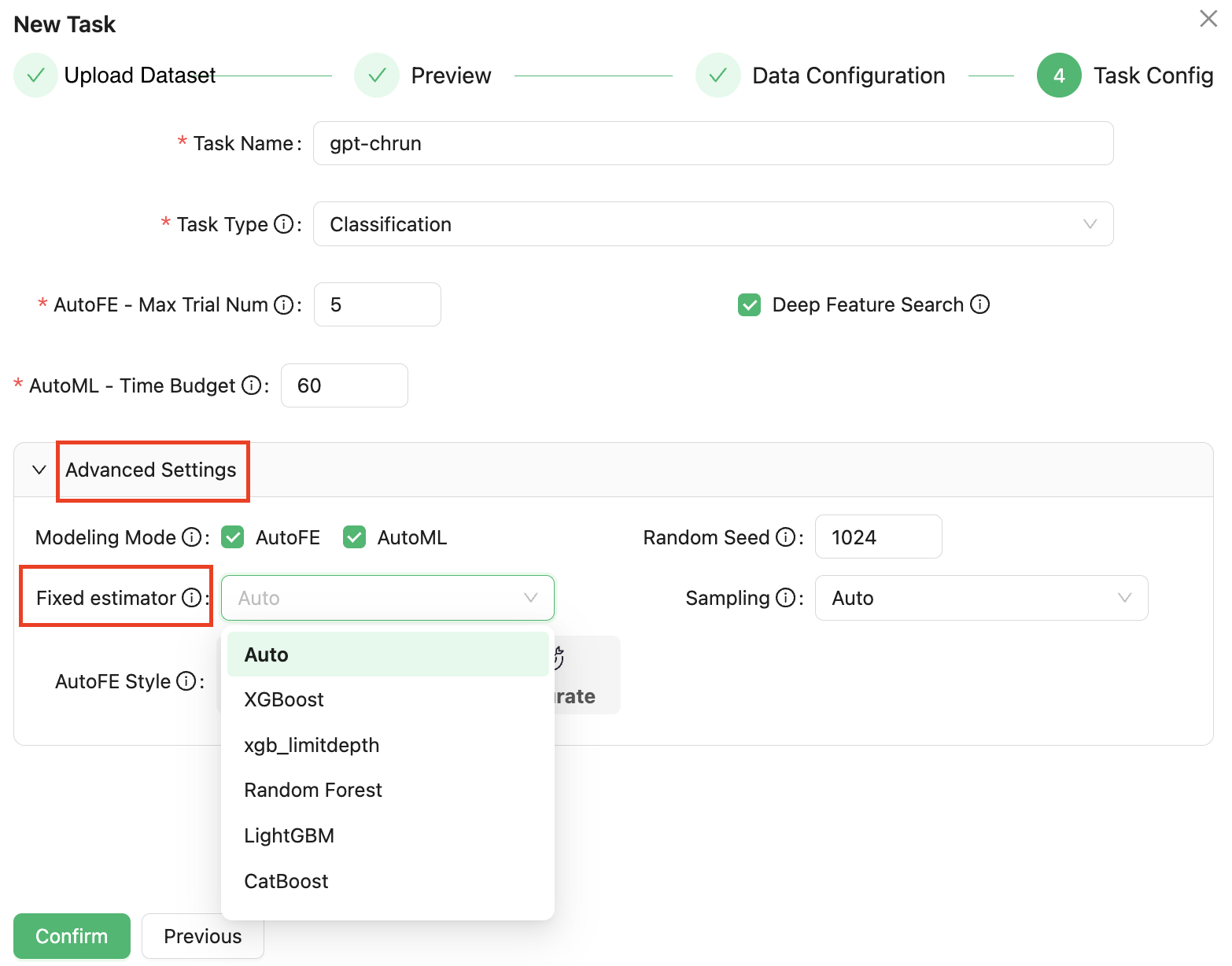
This process is not affected by the previous AutoFE automation feature engineering, if the automatic feature engineering is checked by default, the model specified here is also trained on the original feature and the AutoFE-derived feature together.
Due to the fixed algorithm specified by the user, all time budgets in the AutoML feature engineering stage will be optimized under this algorithm, which saves the time of searching other algorithm models, and thus improves the accuracy.
Appendix: Discovery Records
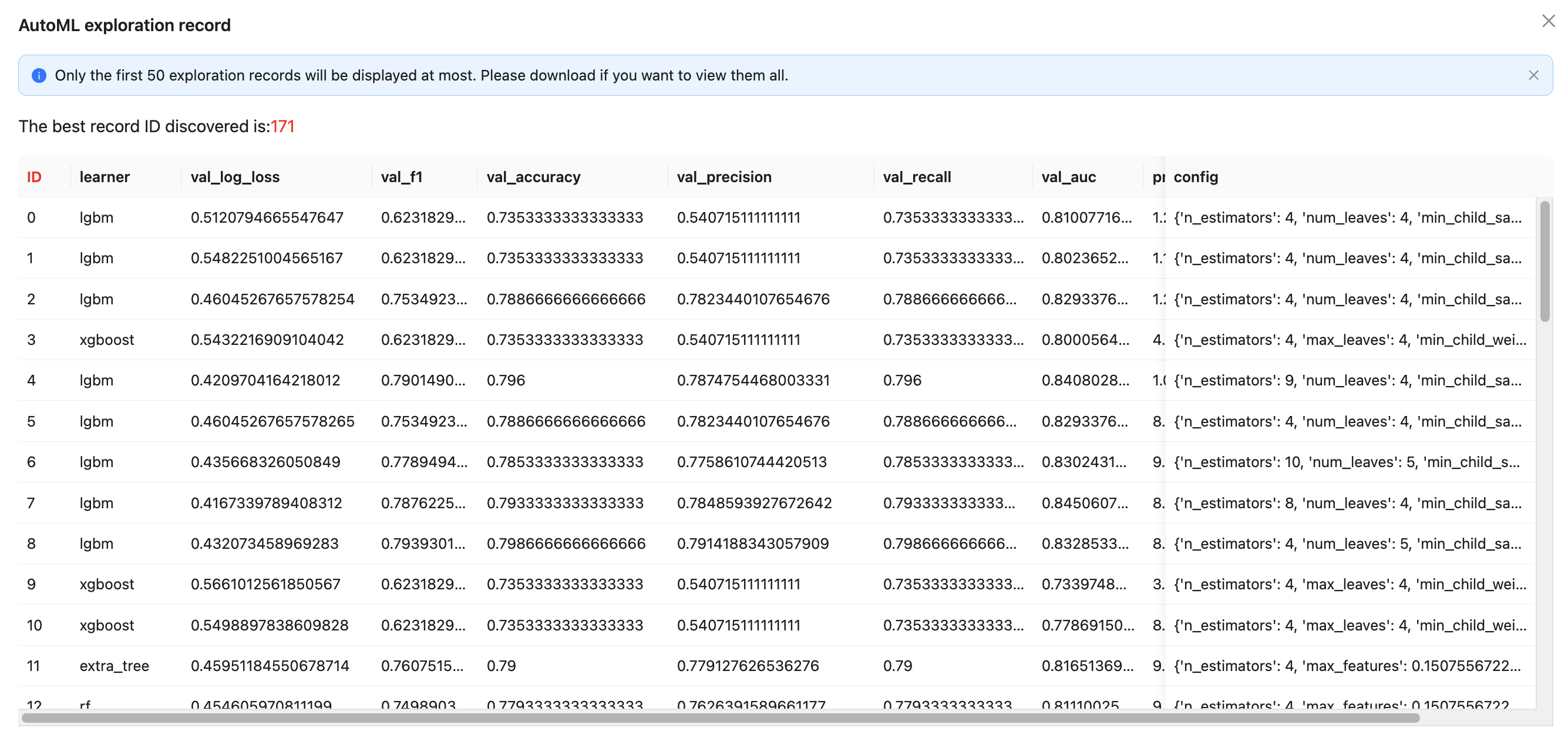
The platform searches for many algorithms and corresponding hyperparameter combinations during the automated machine learning phase. Users can click on the AutoML Records in the Advanced TAB. These records reflect the algorithm and corresponding parameters of different rounds for repetition, while providing more flexible choice space, as shown in the figure below: