Download Model
How to download model?
You can click the “Down model” button of the corresponding task in the “operation” column to download the trained ML model. As shown below:

Model File Structure
You will get a compressed file named model_*.zip after downloading the model file, which records all information about the model and related metadata.
You will extract a folder named “result” using a decompression tool, as shown in the following figure:
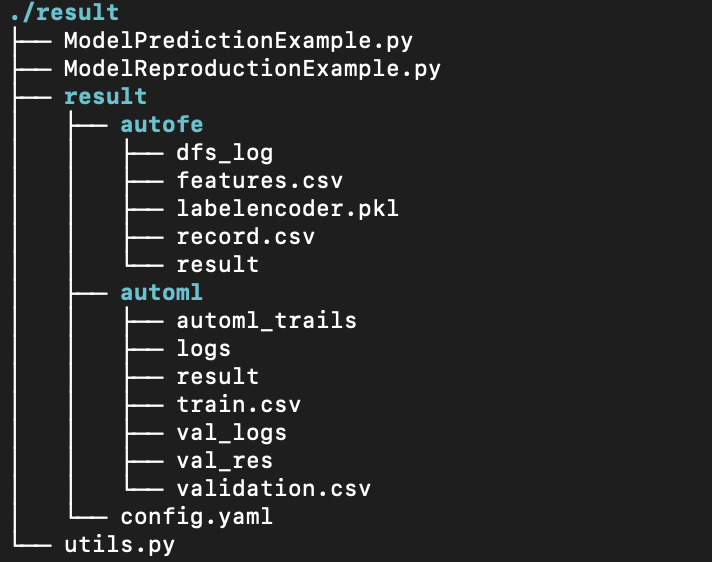
The folder can be roughly divided into the following parts:
-
Model*Example.py file:These files are code samples of ML model usage generated by our platform, including use for new data predictions, or reproduce model without our platform.
-
result folder:This folder stores metadata and other relevant files in the model training process, including AutoFE, AutoML, and modeling task configuration files.
These code requires our library called “changtianml” in the Python public warehouse PyPI , through which the dependency library can be more portable and convenient for users. You can easily do your own magic with ML models, make integrations to your own applications and more starting with downloaded models.
At present, the tool library is still in continuous iteration and improvement, keep updated to know new features!
Model Metadata
Modeling Task Configuration
The configuration information and advanced parameters involved in this modeling process are stored in the config.yaml file.
AutoFE
| File Name | Description |
|---|---|
| features.csv | Advanced feature list (Latex formula style)) |
| record.csv | Advanced feature list details (CSV format) |
| result | Advanced feature list details (JSON format) |
| labelencoder.pkl | Automated feature engineering model binaries |
| dfs_log | Automated feature engineering phase exploration log |
AutoML
| File Name | Description |
|---|---|
| result | AutoML binaries |
| val_res | Validation set prediction result file |
| val_logs | Validation set evaluation metrics file |
| logs | AutoML logs |